
Introduction
Cashnix can create transactions automatically from supported financial SMS messages. Reviewing those transactions helps you confirm that each record is correct before you rely on it for budgets and insights.
This guide explains why review matters, what to look for, and how often you should check your recent activity.
Why reviewing transactions is important
Your main dashboard shows only approved transactions and the ones you add manually. SMS-detected transactions stay in Pending Review until you confirm them. That keeps your balance, income, and expense totals clean.
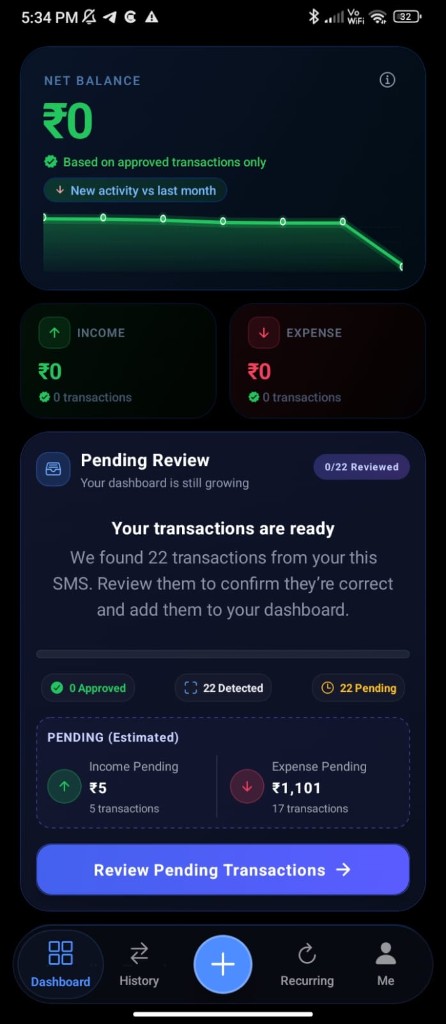
Automatic detection saves time, but no system can understand every message perfectly. A quick review keeps your records aligned with what actually happened in your accounts.
- Catch duplicate or incomplete transactions early
- Confirm merchant names and categories
- Separate expenses from income correctly
- Keep monthly totals trustworthy
- Ignore entries that are not your expenses before they affect the dashboard
How reviewing improves accuracy
Accurate transactions lead to clearer spending insights. When your data is clean, Cashnix can give you a more reliable view of budgets, recurring expenses, and category trends.
- Open the Pending Review section on your dashboard.
- Scan newly detected entries from banks, UPI apps, or wallets.
- Approve correct entries, edit details if needed, or ignore what is not yours.
- Approved transactions then appear in your main dashboard totals.
When you should review transactions
A light review habit is usually enough:
- At the end of the day, after your spending is done
- After a busy spending day
- At the end of each week
- Before checking monthly budget progress
- Whenever an automatic entry looks unfamiliar
End-of-day review
The simplest habit is a short end-of-day check. Open Cashnix, look at today's transactions, and make sure the list matches how you actually spent money.
- Review all transactions tracked for the day.
- Manually add any cash payments the app could not detect, such as chai, sabji, food, auto fare, or small kirana purchases.
- Add a short note in your own words so you remember where the money went later — for example, "bought sabji", "office chai", or "lunch with friends".
- If a tracked transaction was not made by you, ignore it so it is not counted in your dashboard.
Ignore transactions that are not yours
Sometimes Cashnix may detect a message that does not belong to your own spending — for example, a family account alert, a refund message you do not need as an expense, or a debit you did not make.
In those cases, ignore the transaction. Ignored entries are kept out of your dashboard totals, so your reports stay focused only on expenses you actually made.
Tips
- Start with the newest transactions first.
- Add cash spending the same day, before you forget the details.
- Write notes the way you speak — food, chai, sabji, petrol, medicine — so future you can understand them quickly.
- Ignore anything that is not your expense so the dashboard stays clean.
- Pay special attention to large amounts and unfamiliar merchants.
- Update categories while the purchase is still fresh in memory.
FAQ
Frequently asked questions
Do I need to review every transaction?
No. Focus mainly on transactions that were automatically tracked. Confirm those entries, add any missing cash spends, and ignore anything that is not yours.
What if an automatic transaction is wrong?
You can edit it if the details need correction. If the transaction does not need to be added to your records, ignore it so it is not counted in your dashboard.
Why should I add notes for spending?
Because later you can search and clearly see how you spent on chai, petrol, travel, sabji, and other everyday expenses.
Does reviewing help budgeting?
Yes. It improves transaction accuracy and helps you see a clear picture of where money went, so misleading expenses are not added to your budget.